System Architecture
Overview
The Kinana Platform implements a layered microservices architecture deployed on Azure Kubernetes Service (AKS). This document details the system architecture, including service catalog, communication patterns, and deployment configurations.
Architecture Layers
Layer Architecture Diagram
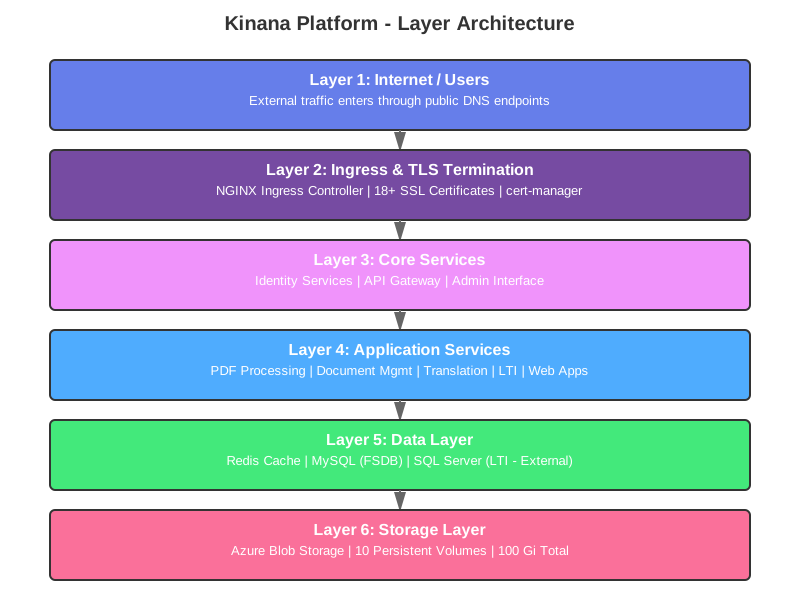
The architecture is organized into 6 distinct layers, each serving a specific purpose:
- Layer 1 (Internet/Users): All external traffic entry point
- Layer 2 (Ingress/TLS): Security, routing, and certificate management
- Layer 3 (Core Services): Authentication, API gateway, and administration
- Layer 4 (Application Services): Specialized microservices for business logic
- Layer 5 (Data Layer): Caching and database services
- Layer 6 (Storage Layer): Persistent blob storage for files and media
Service Catalog
Microservices Overview
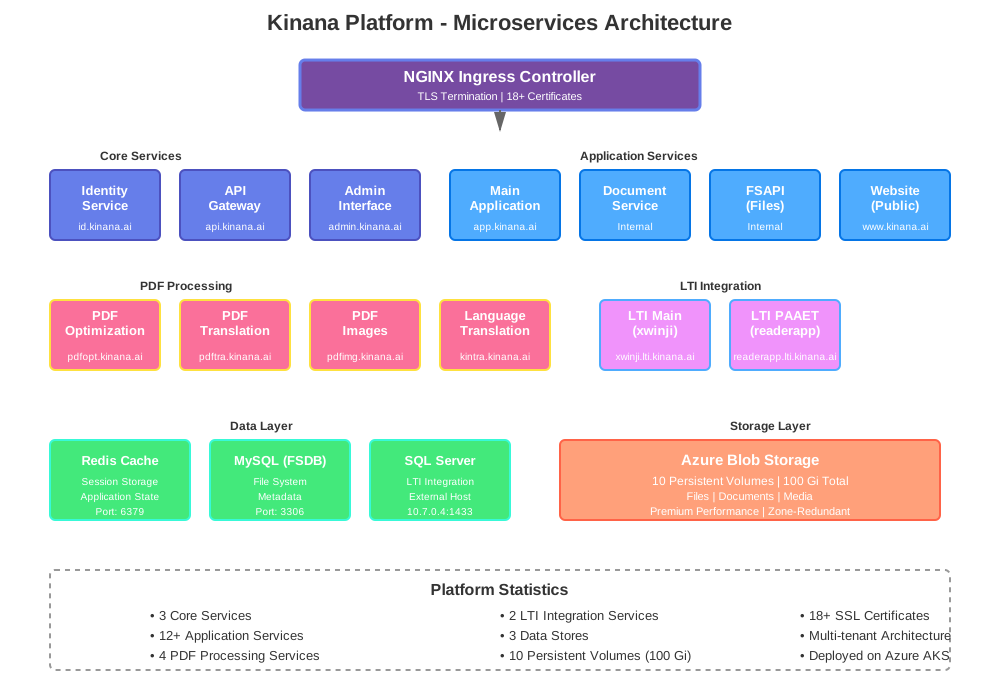
The platform consists of 20+ microservices organized into functional groups. Each service is containerized and runs independently with its own scaling configuration.
Core Services
1. Caching Layer (Redis)
Purpose: Session caching, application state, performance optimization
| Property | Value |
|---|---|
| Image | mcr.microsoft.com/oss/bitnami/redis:6.0.8 |
| Port | 6379 |
| Configuration | No password (development mode) |
| Namespace | kinana-dev |
| Scaling | Single replica |
Environment Variables:
REDIS_DISABLE_COMMANDS: ""
Access Pattern:
- All .NET services connect via hostname "cache"
- Used for session storage and application state
- No persistence (in-memory only)
2. Identity Service (id)
Purpose: Authentication, authorization, user management
| Property | Value |
|---|---|
| Image | uepcr.azurecr.io/kinanaid:1.0.0_dev |
| Port | 80 |
| Endpoints | *.id.kinana.ai, id.kinana.ai |
Dependencies:
- Redis cache
Environment Variables:
REDIS: cache
ASPNETCORE_URLS: http://+:80
Features:
- OAuth 2.0 / OpenID Connect
- JWT token generation
- User registration and management
- Multi-tenant support
3. API Gateway (api)
Purpose: Central API gateway, request routing, aggregation
| Property | Value |
|---|---|
| Image | uepcr.azurecr.io/kinanaapi:1.0.0_dev |
| Port | 80 |
| Endpoint | api.kinana.ai |
Dependencies:
- Redis cache
- Downstream services
Special Configuration:
Caching: /api/files/* (30 days)
Max body size: 1500M
Features:
- Request aggregation
- Service discovery
- Load balancing
- Rate limiting
- Response caching
4. Admin Interface (admin)
Purpose: Administrative dashboard, system management
| Property | Value |
|---|---|
| Image | uepcr.azurecr.io/kinanaadmin:1.0.0_dev |
| Port | 80 |
| Endpoints | *.admin.kinana.ai, admin.kinana.ai |
Configuration:
Proxy buffer size: 8k
Proxy busy buffers: 16k
Max body size: 1500M
Features:
- User management
- Content moderation
- System configuration
- Analytics dashboard
- Audit logs
Document & Content Services
5. Document Service (docs)
Purpose: Document management, processing, storage
| Property | Value |
|---|---|
| Image | uepcr.azurecr.io/kinanadocs:1.0.0 |
| Port | 80 |
| Legacy Domain | docs.akadimi.io |
Features:
- Document upload and storage
- Metadata management
- Version control
- Access control
- Document preview
6. File System Database (FSDB)
Purpose: Metadata for file system operations
| Property | Value |
|---|---|
| Image | uepcr.azurecr.io/kinanafsdb:1.0.0 |
| Type | MySQL |
| Port | 3306 |
| Credentials | root / Hard2Forget |
Schema:
- File metadata tables
- Folder structure
- Permission mappings
- Version history
7. File System API (FSAPI)
Purpose: File upload, download, management
| Property | Value |
|---|---|
| Image | uepcr.azurecr.io/kinanafsapi:1.0.0 |
| Port | 8080 (exposed as 80) |
| Storage | Mounted to kinana-files-dev volume |
| Legacy Domain | fsapi.akadimi.io |
Environment Variables:
APP_ENV: production
Mount Points:
/mnt/files → kinana-files-dev
Features:
- RESTful file API
- Chunked uploads
- Range requests
- Directory browsing
- File metadata
PDF Processing Services
8. PDF Viewer
Purpose: Render and display PDF documents
| Property | Value |
|---|---|
| Image | uepcr.azurecr.io/kinana-pdf-viewer:1.0.0_dev |
| Port | 80 |
| Legacy Domain | pdf.akadimi.io |
Features:
- Server-side PDF rendering
- Page navigation
- Zoom controls
- Text selection
- Annotation support
9. PDF Optimization Service
Purpose: Compress, optimize PDF file sizes
| Property | Value |
|---|---|
| Image | uepcr.azurecr.io/kinana-pdf-optimization-service:1.0.0_dev |
| Port | 80 |
| Endpoint | pdfopt.kinana.ai |
Storage Mounts:
- Documents volume
- Raw documents volume
Processing Features:
- Image compression
- Font subsetting
- Remove unused objects
- Linearization for web
10. PDF Translation Service
Purpose: Translate PDF content
| Property | Value |
|---|---|
| Image | uepcr.azurecr.io/kinana-pdf-translation-service:1.0.0_dev |
| Port | 80 |
| Endpoint | pdftra.kinana.ai |
Features:
- OCR text extraction
- Language detection
- Translation API integration
- Layout preservation
- Right-to-left (RTL) support
11. PDF Images Service
Purpose: Extract images from PDF documents
| Property | Value |
|---|---|
| Image | uepcr.azurecr.io/kinana-pdf-images-service:1.0.0_dev |
| Port | 80 |
| Endpoint | pdfimg.kinana.ai |
Features:
- Image extraction
- Format conversion
- Resolution optimization
- Batch processing
Translation Services
12. Language Translation Service
Purpose: Multi-language content translation
| Property | Value |
|---|---|
| Image | uepcr.azurecr.io/kinana-language-translation-service:1.0.0_dev |
| Port | 80 |
| Endpoint | kintra.kinana.ai |
Supported Languages:
- Arabic (ar)
- English (en)
- French (fr)
- Spanish (es)
Features:
- Neural machine translation
- Context awareness
- Terminology management
- Quality estimation
Web Applications
13. Main Application (app)
Purpose: Primary learning application interface
| Property | Value |
|---|---|
| Image | uepcr.azurecr.io/kinanaapp:1.0.0_dev |
| Port | 80 |
| Endpoints | *.app.kinana.ai, app.kinana.ai |
Features:
- Student dashboard
- Course catalog
- Learning resources
- Progress tracking
- Assessment tools
14. Marketing Website (www)
Purpose: Public-facing marketing website
| Property | Value |
|---|---|
| Image | uepcr.azurecr.io/kinanaweb:1.0.0_dev |
| Port | 3000 (exposed as 80) |
| Endpoint | www.kinana.ai |
Technology:
- Node.js / Express.js
- Static site generation
- SEO optimization
LTI Integration Services
15. LTI Main Service
Purpose: LTI 1.3 integration with external LMS platforms
| Property | Value |
|---|---|
| Image | uepcr.azurecr.io/kinana-lti:1.3.0_dev |
| Port | 3001 (exposed as 80) |
| Endpoint | xwinji.lti.kinana.ai |
| Database | SQL Server (10.7.0.4:1433) |
Configuration:
Tool URL: https://xwinji.app.kinana.ai
Client ID: d84a22ff-7326-41f3-adce-5c9cb177e550
Consumer Key: Akadimi
Scope: openid
Environment Variables:
PORT: 3001
HOST: 0.0.0.0
PRODUCTION: true
CACHE_TTL: 3600
SCOPE: openid
MSSQL_ENCRYPT: true
MSSQL_TRUST_SERVER_CERTIFICATE: true
16. LTI PAAET Service
Purpose: LTI integration for PAAET institution
| Property | Value |
|---|---|
| Image | uepcr.azurecr.io/kinana-lti:1.3.0_dev |
| Port | 3001 (exposed as 80) |
| Endpoint | readerapp.lti.kinana.ai |
| Database | SQL Server (10.7.0.4:1433) |
Configuration:
Tool URL: https://readerapp.app.kinana.ai
Client ID: a2967543-a73f-4459-9b2a-6a3458bab2fe
Consumer Key: Akadimi
Service Communication
Communication Architecture
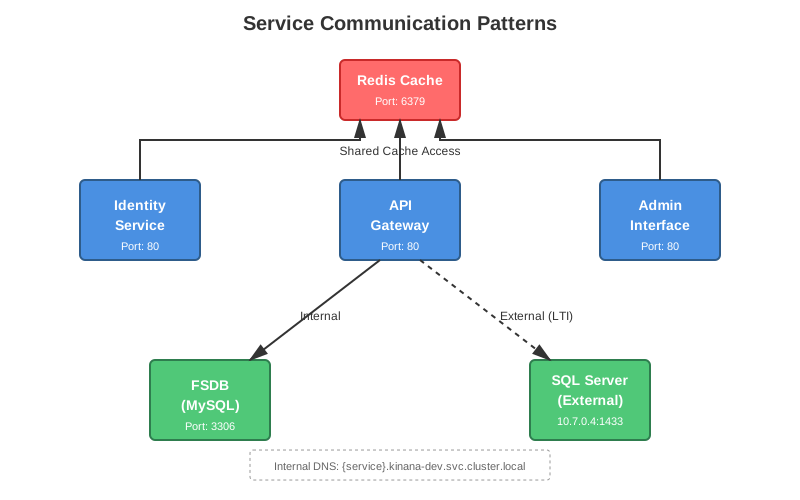
Services communicate using multiple patterns optimized for different scenarios:
Internal Communication
Service Discovery:
- Kubernetes DNS:
<service-name>.kinana-dev.svc.cluster.local - Service mesh ready (optional)
- No authentication for internal calls
Example:
http://cache.kinana-dev.svc.cluster.local:6379
http://fsdb.kinana-dev.svc.cluster.local:3306
External Communication
Ingress Pattern:
User → DNS → NGINX Ingress → TLS Termination → Service
Configuration:
nginx.ingress.kubernetes.io/proxy-body-size: 1500M
nginx.ingress.kubernetes.io/server-snippet: |
  underscores_in_headers on;
  client_max_body_size 2G;
Database Connections
MySQL (Internal):
Host: fsdb.kinana-dev.svc.cluster.local
Port: 3306
User: root
Password: Hard2Forget
SQL Server (External):
Host: 10.7.0.4
Port: 1433
Database: lti_db
User: akadimi
Prefix: kinana
Encrypt: true
TrustServerCertificate: true
Deployment Configuration
Standard Pod Configuration
replicas: 1
imagePullPolicy: Always
nodeSelector:
  kubernetes.io/os: linux
Resource Limits (Recommended)
resources:
  requests:
    memory: "256Mi"
    cpu: "100m"
  limits:
    memory: "1Gi"
    cpu: "1000m"
Health Checks
Liveness Probe:
livenessProbe:
  httpGet:
    path: /health
    port: 80
  initialDelaySeconds: 30
  periodSeconds: 10
Readiness Probe:
readinessProbe:
  httpGet:
    path: /ready
    port: 80
  initialDelaySeconds: 5
  periodSeconds: 5
Port Reference
| Service | Internal Port | Exposed Port | Protocol |
|---|---|---|---|
| Redis | 6379 | 6379 | TCP |
| Identity | 8080 | 80 | HTTP |
| API | 8080 | 80 | HTTP |
| Admin | 8080 | 80 | HTTP |
| FSDB (MySQL) | 3306 | 3306 | TCP |
| FSAPI | 8080 | 80 | HTTP |
| Website | 3000 | 80 | HTTP |
| LTI Services | 3001 | 80 | HTTP |
| All other services | 8080 | 80 | HTTP |
Service Dependencies
Dependency Graph
┌─────────┐
│  Redis  │◄─────────────┬─────────────┬──────────────┐
└─────────┘              │             │              │
                         │             │              │
                   ┌─────▼────┐   ┌───▼────┐   ┌────▼────┐
                   │ Identity │   │  API   │   │  Admin  │
                   └──────────┘   └────────┘   └─────────┘
                                       │
                              ┌────────┴────────┐
                              │                 │
                        ┌─────▼────┐      ┌────▼─────┐
                        │   FSAPI  │      │   Docs   │
                        └──────────┘      └──────────┘
                              │
                        ┌─────▼────┐
                        │   FSDB   │
                        └──────────┘
Scaling Strategies
Horizontal Scaling
Stateless Services:
kubectl scale deployment api --replicas=3 -n kinana-dev
Stateful Services:
- Use StatefulSets
- Implement leader election
- Configure persistent volumes
Vertical Scaling
Resource Adjustment:
resources:
  requests:
    memory: "512Mi"
    cpu: "500m"
  limits:
    memory: "2Gi"
    cpu: "2000m"
Auto-Scaling (HPA)
apiVersion: autoscaling/v2
kind: HorizontalPodAutoscaler
metadata:
  name: api-hpa
spec:
  scaleTargetRef:
    apiVersion: apps/v1
    kind: Deployment
    name: api
  minReplicas: 2
  maxReplicas: 10
  metrics:
  - type: Resource
    resource:
      name: cpu
      target:
        type: Utilization
        averageUtilization: 70
Monitoring and Health
Service Health Endpoints
| Service | Health Endpoint |
|---|---|
| Identity | /health |
| API | /health |
| Admin | /health |
| FSAPI | /health |
Metrics Collection
Prometheus Annotations:
prometheus.io/scrape: "true"
prometheus.io/port: "80"
prometheus.io/path: "/metrics"
Troubleshooting
Common Issues
1. Pod CrashLoopBackOff
# Check logs
kubectl logs <pod-name> -n kinana-dev

# Describe pod for events
kubectl describe pod <pod-name> -n kinana-dev
2. Service Unavailable
# Check service endpoints
kubectl get endpoints -n kinana-dev

# Check ingress
kubectl describe ingress -n kinana-dev
3. Database Connection Issues
# Test MySQL connection
kubectl run -it --rm debug --image=mysql:8.0 --restart=Never \
  -- mysql -h fsdb.kinana-dev.svc.cluster.local -u root -p
Quick Reference Commands
View Service Health:
kubectl get pods -n kinana-dev
kubectl get services -n kinana-dev
kubectl get ingress -n kinana-dev
View Logs:
kubectl logs -l app=<service-name> -n kinana-dev
kubectl logs -l app=<service-name> -n kinana-dev --tail=100 -f
Scale Service:
kubectl scale deployment <service-name> --replicas=3 -n kinana-dev
Document Version: 1.0
Last Updated: November 2024
Classification: Unclassified