Integration Architecture
Overview
The Kinana Platform provides comprehensive integration capabilities to connect with external systems, Learning Management Systems (LMS), and third-party services. This document details the integration patterns, protocols, and implementations.
Integration Patterns
1. API-Based Integration
RESTful APIs for programmatic access to platform features.
2. LTI Integration
Standards-based integration with Learning Management Systems.
3. Event-Driven Integration
Webhooks and event notifications for real-time updates.
4. Batch Integration
Scheduled data synchronization and bulk operations.
LTI Integration
LTI 1.3 Overview
Learning Tools Interoperability (LTI) 1.3 is an IMS Global standard for integrating learning tools with LMS platforms.
Key Features:
- OAuth 2.0 / OpenID Connect based
- Secure tool launches
- Grade passback
- Deep linking
- Names and Role Provisioning
LTI Architecture
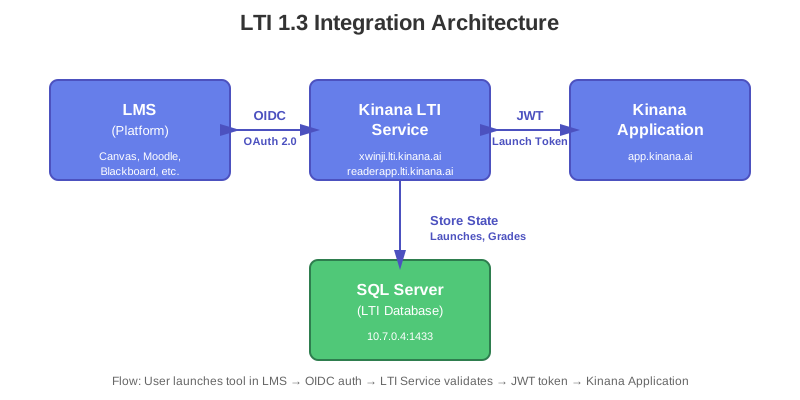
The LTI integration follows the LTI Advantage 1.3 specification with OAuth 2.0 / OpenID Connect authentication flow.
LTI Configuration
Tool Registration
Tool Details: | Property | Value | |----------|-------| | Tool URL | https://[tenant].app.kinana.ai | | Redirect URIs | https://[tenant].lti.kinana.ai/launch | | Launch URL | https://[tenant].app.kinana.ai/lti/launch | | JWKS URL | https://[tenant].lti.kinana.ai/.well-known/jwks.json |
Supported Institutions:
General LTI (xwinji.lti.kinana.ai)
{
  "client_id": "d84a22ff-7326-41f3-adce-5c9cb177e550",
  "tool_url": "https://xwinji.app.kinana.ai",
  "consumer_key": "Akadimi",
  "scope": "openid"
}
PAAET Specific (readerapp.lti.kinana.ai)
{
  "client_id": "a2967543-a73f-4459-9b2a-6a3458bab2fe",
  "tool_url": "https://readerapp.app.kinana.ai",
  "consumer_key": "Akadimi"
}
LTI Launch Flow
Step 1: OIDC Login Initiation
1. LMS → Initiates Login
   GET /login_initiation
   Parameters:
     - iss: Platform issuer
     - login_hint: User identifier
     - target_link_uri: Destination URL
     - lti_message_hint: Context information
Step 2: Authentication Request
2. LTI Service → Redirects to LMS
   GET /authorize
   Parameters:
     - response_type: id_token
     - client_id: Tool client ID
     - redirect_uri: Launch endpoint
     - scope: openid
     - nonce: Security token
     - state: Session state
     - prompt: none
Step 3: Authentication Response
3. LMS → Returns to Tool
   POST /launch
   Parameters:
     - id_token: JWT with claims
     - state: Session state
Step 4: Token Validation
// Validate ID token
const idToken = request.body.id_token;
const decodedToken = jwt.decode(idToken, { complete: true });

// Verify signature
const jwks = await fetchJWKS(platform.jwks_endpoint);
const publicKey = findKey(jwks, decodedToken.header.kid);
jwt.verify(idToken, publicKey);

// Validate claims
validateClaims(decodedToken.payload);
Step 5: Session Creation
// Create session
const session = {
  launch_id: generateUUID(),
  user_id: idToken.sub,
  context_id: idToken['https://purl.imsglobal.org/spec/lti/claim/context'].id,
  resource_link_id: idToken['https://purl.imsglobal.org/spec/lti/claim/resource_link'].id,
  roles: idToken['https://purl.imsglobal.org/spec/lti/claim/roles'],
  launched_at: new Date()
};

// Store in database
await saveLaunchSession(session);

// Create application JWT
const appToken = createApplicationToken(session);

// Redirect to application
response.redirect(`${tool_url}/lti/entry?token=${appToken}`);
LTI Claims
Standard Claims:
{
  "iss": "https://lms.example.com",
  "sub": "user-123",
  "aud": "client-id",
  "exp": 1700000000,
  "iat": 1699996400,
  "nonce": "nonce-value",
  "https://purl.imsglobal.org/spec/lti/claim/message_type": "LtiResourceLinkRequest",
  "https://purl.imsglobal.org/spec/lti/claim/version": "1.3.0",
  "https://purl.imsglobal.org/spec/lti/claim/deployment_id": "deployment-1",
  "https://purl.imsglobal.org/spec/lti/claim/target_link_uri": "https://tool.example.com/launch",
  "https://purl.imsglobal.org/spec/lti/claim/resource_link": {
    "id": "resource-123",
    "title": "Chapter 1 Quiz"
  },
  "https://purl.imsglobal.org/spec/lti/claim/roles": [
    "http://purl.imsglobal.org/vocab/lis/v2/membership#Instructor"
  ],
  "https://purl.imsglobal.org/spec/lti/claim/context": {
    "id": "course-123",
    "label": "CS101",
    "title": "Introduction to Computer Science"
  }
}
Grade Passback (Assignment and Grade Services)
Service Endpoint
POST /ags/lineitems/{lineitem_id}/scores
Score Submission
{
  "timestamp": "2024-11-19T08:00:00Z",
  "scoreGiven": 85,
  "scoreMaximum": 100,
  "comment": "Good work!",
  "activityProgress": "Completed",
  "gradingProgress": "FullyGraded",
  "userId": "user-123"
}
Implementation
async function submitGrade(launchId, userId, score, maximum) {
  // Get launch session
  const launch = await getLaunchSession(launchId);

  // Get AGS endpoint
  const agsEndpoint = launch.ags_endpoint;
  const lineItemUrl = launch.lineitem_url;

  // Get access token
  const accessToken = await getServiceAccessToken(launch.platform_id);

  // Submit score
  const response = await fetch(`${lineItemUrl}/scores`, {
    method: 'POST',
    headers: {
      'Authorization': `Bearer ${accessToken}`,
      'Content-Type': 'application/vnd.ims.lis.v1.score+json'
    },
    body: JSON.stringify({
      timestamp: new Date().toISOString(),
      scoreGiven: score,
      scoreMaximum: maximum,
      userId: userId,
      activityProgress: 'Completed',
      gradingProgress: 'FullyGraded'
    })
  });

  return response.status === 200;
}
Deep Linking
Purpose: Allow instructors to select content within the LMS.
Deep Linking Request:
{
  "https://purl.imsglobal.org/spec/lti/claim/message_type": "LtiDeepLinkingRequest",
  "https://purl.imsglobal.org/spec/lti-dl/claim/deep_linking_settings": {
    "deep_link_return_url": "https://lms.example.com/deep_link_return",
    "accept_types": ["link", "ltiResourceLink"],
    "accept_presentation_document_targets": ["iframe", "window"],
    "accept_multiple": true,
    "auto_create": false
  }
}
Deep Linking Response:
// Content selection
const selectedContent = [
  {
    type: 'ltiResourceLink',
    title: 'Interactive Lesson 1',
    url: 'https://tool.example.com/lesson/1',
    custom: {
      lesson_id: '123'
    }
  }
];

// Create JWT response
const deepLinkingResponse = createJWT({
  iss: clientId,
  aud: platform.issuer,
  exp: Date.now() / 1000 + 3600,
  iat: Date.now() / 1000,
  nonce: generateNonce(),
  'https://purl.imsglobal.org/spec/lti/claim/message_type': 'LtiDeepLinkingResponse',
  'https://purl.imsglobal.org/spec/lti/claim/version': '1.3.0',
  'https://purl.imsglobal.org/spec/lti-dl/claim/content_items': selectedContent
});

// Redirect back to LMS
response.redirect(`${deep_link_return_url}?JWT=${deepLinkingResponse}`);
API Integration
RESTful API
Base URL: https://api.kinana.ai
Authentication: Bearer token (JWT)
Common Headers:
Authorization: Bearer <jwt_token>
Content-Type: application/json
Accept: application/json
X-Tenant-ID: <tenant_id>
API Endpoints
Authentication
POST /auth/login
POST /auth/refresh
POST /auth/logout
Files
GET    /files
POST   /files
GET    /files/{id}
PUT    /files/{id}
DELETE /files/{id}
POST   /files/{id}/share
Users
GET    /users
POST   /users
GET    /users/{id}
PUT    /users/{id}
DELETE /users/{id}
API Request Examples
Upload File
curl -X POST https://api.kinana.ai/files \
  -H "Authorization: Bearer <token>" \
  -H "Content-Type: multipart/form-data" \
  -F "file=@document.pdf" \
  -F "folder_id=123"
Response:
{
  "id": "file-uuid",
  "name": "document.pdf",
  "size": 1048576,
  "mime_type": "application/pdf",
  "url": "https://api.kinana.ai/files/file-uuid/download",
  "created_at": "2024-11-19T08:00:00Z"
}
Get File Metadata
curl -X GET https://api.kinana.ai/files/file-uuid \
  -H "Authorization: Bearer <token>"
Response:
{
  "id": "file-uuid",
  "name": "document.pdf",
  "size": 1048576,
  "mime_type": "application/pdf",
  "owner": {
    "id": "user-uuid",
    "name": "John Doe"
  },
  "folder": {
    "id": "folder-uuid",
    "name": "My Documents"
  },
  "created_at": "2024-11-19T08:00:00Z",
  "updated_at": "2024-11-19T08:00:00Z"
}
Rate Limiting
Limits:
- 100 requests per minute per user
- 1000 requests per minute per tenant
- 10,000 requests per hour per IP
Headers:
X-RateLimit-Limit: 100
X-RateLimit-Remaining: 95
X-RateLimit-Reset: 1700000000
Rate Limit Exceeded:
{
  "error": "rate_limit_exceeded",
  "message": "API rate limit exceeded",
  "retry_after": 60
}
Webhook Integration
Webhook Events
Supported Events:
file.createdfile.updatedfile.deleteduser.createduser.updatedgrade.submitted
Webhook Configuration
{
  "url": "https://your-system.example.com/webhook",
  "events": ["file.created", "file.updated"],
  "secret": "webhook-secret-key",
  "active": true
}
Webhook Payload
Example: file.created
{
  "event": "file.created",
  "timestamp": "2024-11-19T08:00:00Z",
  "data": {
    "id": "file-uuid",
    "name": "document.pdf",
    "size": 1048576,
    "owner_id": "user-uuid",
    "created_at": "2024-11-19T08:00:00Z"
  }
}
Webhook Security
Signature Verification:
const crypto = require('crypto');

function verifyWebhookSignature(payload, signature, secret) {
  const computedSignature = crypto
    .createHmac('sha256', secret)
    .update(JSON.stringify(payload))
    .digest('hex');

  return crypto.timingSafeEqual(
    Buffer.from(signature),
    Buffer.from(computedSignature)
  );
}
Azure Service Integration
Azure Blob Storage
Connection:
- Using Azure Blob Storage CSI Driver
- Mounted as Kubernetes persistent volumes
Access Pattern:
const { BlobServiceClient } = require('@azure/storage-blob');

const blobServiceClient = BlobServiceClient.fromConnectionString(
  process.env.AZURE_STORAGE_CONNECTION_STRING
);

const containerClient = blobServiceClient.getContainerClient('kinanafiles');
Azure Key Vault
Secret Retrieval:
const { SecretClient } = require('@azure/keyvault-secrets');
const { DefaultAzureCredential } = require('@azure/identity');

const credential = new DefaultAzureCredential();
const vaultUrl = 'https://ibt-prd-kv-01.vault.azure.net/';
const client = new SecretClient(vaultUrl, credential);

const secret = await client.getSecret('database-password');
Third-Party Service Integration
Translation Services
Supported Providers:
- Google Cloud Translation API
- Microsoft Azure Translator
- DeepL API
Translation Request:
async function translateText(text, targetLang) {
  const response = await fetch('https://kintra.kinana.ai/translate', {
    method: 'POST',
    headers: {
      'Content-Type': 'application/json'
    },
    body: JSON.stringify({
      text: text,
      target_language: targetLang,
      source_language: 'auto'
    })
  });

  return response.json();
}
PDF Processing
Optimization Service:
curl -X POST https://pdfopt.kinana.ai/optimize \
  -F "file=@document.pdf" \
  -F "quality=high"
Translation Service:
curl -X POST https://pdftra.kinana.ai/translate \
  -F "file=@document.pdf" \
  -F "target_lang=ar"
Integration Best Practices
Security
- Always use HTTPS
- Validate all inputs
- Implement rate limiting
- Use API keys with limited scope
- Rotate credentials regularly
Error Handling
- Provide meaningful error messages
- Use appropriate HTTP status codes
- Implement retry logic with exponential backoff
- Log all integration errors
Performance
- Implement caching where appropriate
- Use pagination for large datasets
- Compress responses
- Monitor API performance
Monitoring
- Track API usage metrics
- Monitor error rates
- Set up alerts for failures
- Log all integration activities
Integration Testing
LTI Testing
Test Launch:
# Use IMS Global LTI Advantage Test Suite
# https://lti-ri.imsglobal.org/
Manual Testing:
- Configure test LMS (Canvas, Moodle, Blackboard)
- Register tool
- Create test course
- Add LTI link
- Launch as student/instructor
- Verify functionality
API Testing
Postman Collection:
{
  "info": {
    "name": "Kinana API",
    "schema": "https://schema.getpostman.com/json/collection/v2.1.0/"
  },
  "item": [
    {
      "name": "Authentication",
      "item": [
        {
          "name": "Login",
          "request": {
            "method": "POST",
            "url": "/auth/login",
            "body": {
              "email": "user@example.com",
              "password": "password"
            }
          }
        }
      ]
    }
  ]
}
Document Version: 1.0
Last Updated: November 2024
Classification: Unclassified